Just returning to my earlier post; using the Openscales API and combining WFS and WMS in one place. The goal was to use a styled map image (returned by a WMS call) and use Flex to draw the features on this image (via a WFS call), to give interactivity. One problem I found was that we needed to give the WFS drawn features a transparency of 0. This way we could get the interactivity (eg click on feature and get attributes pop up) but not see the drawn feature. But, suppose we want this selected feature highlighted in a different colour? Since the transparency is set to 0, the highlight will not be visible. How to get around this ....
Remember the Openscales map is constructed with multiple layers (imagine looking down at multiple sheets of tracing paper, on one there is a road drawn, on another a river etc all lined up correctly geographically). Our WFS (selected) layer is on one of these sheets. So all points marking well, for example, are on this one sheet. But all the points on this sheet have a transparency of 0, so they are there, but invisible. Now it is the sheet or layer which is set to 0 transparency not individual points (polygons or lines) The solution to being able to highlight a selected point (WFS feature)
......
Set a blank map feature layer. Set the transparency to 1. When a point is selected copy this to the blank layer. Hey presto it appears, Make sure when you unselect the point you both copy the point back to its original layer and then clear the blank layer.
Showing posts with label OpenScales. Show all posts
Showing posts with label OpenScales. Show all posts
Monday, August 2, 2010

Tuesday, July 27, 2010
Flex - Styling Interactive Maps
I had an interesting question recently. This was with regards building a mapping application using the open source mapping Flex library Openscales. He wanted to improve the styling of the map layers, but still be able to click on a feature and return attributes. Now Openscales is nice since both WMS and WFS calls are easy.
Let me step back quickly and explain the difference between WFS and WMS. Both involve calls to a spatial server, in this case to Geoserver. WFS returns the raw data. So Flex is able to draw the boundaries of features, making the feature interactive. The features attributes are also returned. Thus a click on a feature can return the features attributes without a additional server call. WMS simply returns an image. Getting the attributes for the latter would require both an additional server call and constructing a new query.
It struck me after thinking about this for a while. Why not combine WFS with WMS. Thus request both a styled WMS image and draw on this the WFS features. Make the WFS feature fully transparent, thus only the WMS styling shows.
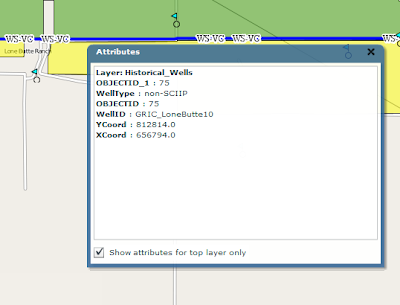
After playing with this, the results were pleasingly good. The one thing I'm finding is challenging is the ability for a selected WFS feature to be highlighted when selected. Since it is fully transparent.
I have a potential solution. And will share once I have tested
Let me step back quickly and explain the difference between WFS and WMS. Both involve calls to a spatial server, in this case to Geoserver. WFS returns the raw data. So Flex is able to draw the boundaries of features, making the feature interactive. The features attributes are also returned. Thus a click on a feature can return the features attributes without a additional server call. WMS simply returns an image. Getting the attributes for the latter would require both an additional server call and constructing a new query.
It struck me after thinking about this for a while. Why not combine WFS with WMS. Thus request both a styled WMS image and draw on this the WFS features. Make the WFS feature fully transparent, thus only the WMS styling shows.

After playing with this, the results were pleasingly good. The one thing I'm finding is challenging is the ability for a selected WFS feature to be highlighted when selected. Since it is fully transparent.
I have a potential solution. And will share once I have tested
Tuesday, December 15, 2009
OpenScales
I've been working for some time now with the Openscales AS3 library. Finally we have a Flex GIS client. The library is work in progress, but already offers really nice features and functions. At some point soon I will share some of my work and code. I've been busy customising core functional elements including adding Yahoo and Bing baselayers, restricting WFS rendering to scale, allowing WFS layers to be turned on and off, custom styling the interface and components. More to come.
Sunday, November 15, 2009
AlivePDF
Its been a hectic time with project work. Much to share particularly with regards the ArcGIS Flex API and the open source OpenScales Flex library.
Just a quick mention today on AlivePDF. Historically, I've had to generate PDF's in PHP. AlivePDF is based on the PHP library FPDF. It makes generating PDF's from Flex very straighforward. Alex Britez has written a simple example here.
Just a quick mention today on AlivePDF. Historically, I've had to generate PDF's in PHP. AlivePDF is based on the PHP library FPDF. It makes generating PDF's from Flex very straighforward. Alex Britez has written a simple example here.
Saturday, October 17, 2009
Open Source GIS Clients
I have had a number of companies recently approach me about open source GIS options. This has something to do with my recently published articles. One interesting area has been an investigation into Flex GIS clients. Openlayers is the premier Web 2.0 GIS client; well supported, a rich library filled with an array of functionality .. but written in Javascript. Now I have nothing against Javascript, its free, has a big community behind it and runs in the browser. But I'm a Flex developer. I prefer it because .. it has an excellent IDE which makes for easy debugging, developing sophisticated interactive application is both quick and easy, applications run the same in all browsers, actionscript is object oriented. Actionscript is just nicer and easier to work with .. in my view.
So enough. Anybody who argues against these opinions I would not oppose. Its just how I feel about it. Anyway, the whole Flex GIS open source client issue. I have worked with Modest Maps for sometime now to develop mostly consumer maps. Stop right there! Consumer maps? The world of online maps remains somewhat split. GIS maps and consumer maps. Consumer maps I define as the use of basemaps - tiles which are derived from satellite images or vector road maps for example - to build mash ups; video, imagery, text using, often, the addition of map markers for access (or clickable icons geospatially placed on the map). Here is a simple example. Google, Yahoo, Bing, mapquest offer largely API's for developing consumer maps.
So what are online GIS maps. A simple question? Well maybe. GIS has moved from the desktop to the Web. It was very much a niche market. Geography type nerds generating applications and analyses in large part for government (a generalisation but close to reality). The frustration for GIS vendors was how do they broaden the market. ESRI and the other key private vendors struggled to sell into the enterprise. They still do in fact.
Suddenly google maps arrived on the scene. It shook the mapping industry to its core. Internet maps were everywhere. Its worth noting that Mapquest preceded Google, but the fanfare (and $) waited for Googles arrival. Suddenly the other GIS vendors needed to react. ESRI produced rival online products. But with a GIS twist.
So here we are today. A plethora of consumer map APIs. And ESRI sitting in a somewhat awkward position offering free API's hooking easily into their own server product(s) ArcGIS (not so easily into other providers). Offering consumer and GIS API functionality. With a focus to sell their complete stack to those interested. Their purpose is to make money.
So how about those of us wanting to build online GIS maps, but avoid the high cost of the private vendor solutions? The open source GIS stack is very mature. But how about Flex clients?
I've spent some time looking at the options. Base requirements include:
- Rendering both WFS and WMS in combination
- Overlays of these services on various basemaps
- Drawing tools for line point and polygons
- Identify functionality
I looked at both Modest Maps and OpenScales. Though not its focus there has been some work done on Modest Maps toward some level of interaction with spatial servers. I added a WMS layer at:
http://www.flexmappers.com/mapserving/mapservingWMS/
Note, I had to make some tweeks to the WMS provider, provided with the library.
Openscales is less mature. But very impressive for how long development has been underway. I built the following map application:
http://www.flexmappers.com/mapserving/openscales.html
It supplies much of the base functionality I was looking to include. WMS is proving a little challenging (but i suspect a style tag is mssing from the tile request) and the map interaction is not a smooth as Modest maps. Only openstreetmap is provided, but I am looking to port code from Modest maps to add this functionality.
Ultimately Flex should simply be rendering the points, lines, and polygons supplied by the server.
I am interested to see how easy it might be to port from one library to the other. Either way, Openscales is a very interesting project. One well worth supporting.
So enough. Anybody who argues against these opinions I would not oppose. Its just how I feel about it. Anyway, the whole Flex GIS open source client issue. I have worked with Modest Maps for sometime now to develop mostly consumer maps. Stop right there! Consumer maps? The world of online maps remains somewhat split. GIS maps and consumer maps. Consumer maps I define as the use of basemaps - tiles which are derived from satellite images or vector road maps for example - to build mash ups; video, imagery, text using, often, the addition of map markers for access (or clickable icons geospatially placed on the map). Here is a simple example. Google, Yahoo, Bing, mapquest offer largely API's for developing consumer maps.
So what are online GIS maps. A simple question? Well maybe. GIS has moved from the desktop to the Web. It was very much a niche market. Geography type nerds generating applications and analyses in large part for government (a generalisation but close to reality). The frustration for GIS vendors was how do they broaden the market. ESRI and the other key private vendors struggled to sell into the enterprise. They still do in fact.
Suddenly google maps arrived on the scene. It shook the mapping industry to its core. Internet maps were everywhere. Its worth noting that Mapquest preceded Google, but the fanfare (and $) waited for Googles arrival. Suddenly the other GIS vendors needed to react. ESRI produced rival online products. But with a GIS twist.
So here we are today. A plethora of consumer map APIs. And ESRI sitting in a somewhat awkward position offering free API's hooking easily into their own server product(s) ArcGIS (not so easily into other providers). Offering consumer and GIS API functionality. With a focus to sell their complete stack to those interested. Their purpose is to make money.
So how about those of us wanting to build online GIS maps, but avoid the high cost of the private vendor solutions? The open source GIS stack is very mature. But how about Flex clients?
I've spent some time looking at the options. Base requirements include:
- Rendering both WFS and WMS in combination
- Overlays of these services on various basemaps
- Drawing tools for line point and polygons
- Identify functionality
I looked at both Modest Maps and OpenScales. Though not its focus there has been some work done on Modest Maps toward some level of interaction with spatial servers. I added a WMS layer at:
http://www.flexmappers.com/mapserving/mapservingWMS/
Note, I had to make some tweeks to the WMS provider, provided with the library.
Openscales is less mature. But very impressive for how long development has been underway. I built the following map application:
http://www.flexmappers.com/mapserving/openscales.html
It supplies much of the base functionality I was looking to include. WMS is proving a little challenging (but i suspect a style tag is mssing from the tile request) and the map interaction is not a smooth as Modest maps. Only openstreetmap is provided, but I am looking to port code from Modest maps to add this functionality.
Ultimately Flex should simply be rendering the points, lines, and polygons supplied by the server.
I am interested to see how easy it might be to port from one library to the other. Either way, Openscales is a very interesting project. One well worth supporting.
Tuesday, September 22, 2009
OpenScales
While becoming increasingly more impressed with Openlayers I came across OpenScales. A porting of sorts of Openlayers to Actionscript 3.0. Some key links below:
My OpenStreetmap, WMS, WFS Test
http://www.flexmappers.com/openscales
Code Examples
http://openscales.org/svn/openscales/trunk/openscales-fx-examples/src/main/flex/
Demo
http://openscales.org/openscales.swf
api
http://openscales.org/mvn-site/
http://openscales.org/mvn-site/openscales-core/asdoc/index.html
GetCapabilities Test
http://openscales.org/proxy.php?url=http://sigma.openplans.org/geoserver/ows?service=WFS%26request%3DGetCapabilities
My OpenStreetmap, WMS, WFS Test
http://www.flexmappers.com/openscales
Code Examples
http://openscales.org/svn/openscales/trunk/openscales-fx-examples/src/main/flex/
Demo
http://openscales.org/openscales.swf
api
http://openscales.org/mvn-site/
http://openscales.org/mvn-site/openscales-core/asdoc/index.html
GetCapabilities Test
http://openscales.org/proxy.php?url=http://sigma.openplans.org/geoserver/ows?service=WFS%26request%3DGetCapabilities
Subscribe to:
Comments (Atom)