Available for download from the ESRI Flex web site is the Flex template. The template and widgets are free. This provides out of the box basic and advanced Web ArcGIS functionality using Flex. From zoom, and pan to address locator and query builder; there are a range of different widgets provided by ESRI and their user community. Build a Flex based ArcGIS web site in minutes. Well maybe.
The biggest two main advantages of the template are fast development and the built in animation. The basic template comes with a core set of widgets or modules which are easily loaded into the template framework. Additional widgets are available for download. The framework has some nice built in animation when widgets are loaded and unloaded.
From a development perspective, modules are easy to build and integrate into the framework. So what then are the disadvantages? These are worth considering not only in deciding whether to use the template but also in planning and estimating. Often the time to develop a site using the template is longer than expected. So let us list out these disadvantages:
- Inflexible UI - you will quickly recognise sites built from the template. Both the look and feel and animation are a give away. It is not easy to customise the UI to make it unique.
- The need to customise widgets - widgets have usually been built for a specific purpose, particularly the more advanced widgets such as query builder. Often clients have their own specific needs, You may thus find yourself pulling the widget apart. This may prove more challenging than it appears. What seem simple modifications may actually take considerably longer. In some case it may be quicker to simply rebuild the widget from scratch.
- Locked into ArcGIS - Not really a disadvantage, but worth noting; the template is only for use with ArcGIS. It is not a template which can be used to hook into other spatial servers. It would be nice if you could easily use this for interacting with other spatial servers, notably Geoserver or Mapserver. But it is an ESRI solution, so why allow access to the ‘competition’.
Overall, the template is a nice solution for clients who have limited budgets and want standard functionality. But, more complexity and a custom look and feel will both be challenging and time consuming. Step back and look closely at client needs. If the requirement is very specific, think about building the application using the ArcGIS Flex API.
Tuesday, July 27, 2010

Flex - Styling Interactive Maps
I had an interesting question recently. This was with regards building a mapping application using the open source mapping Flex library Openscales. He wanted to improve the styling of the map layers, but still be able to click on a feature and return attributes. Now Openscales is nice since both WMS and WFS calls are easy.
Let me step back quickly and explain the difference between WFS and WMS. Both involve calls to a spatial server, in this case to Geoserver. WFS returns the raw data. So Flex is able to draw the boundaries of features, making the feature interactive. The features attributes are also returned. Thus a click on a feature can return the features attributes without a additional server call. WMS simply returns an image. Getting the attributes for the latter would require both an additional server call and constructing a new query.
It struck me after thinking about this for a while. Why not combine WFS with WMS. Thus request both a styled WMS image and draw on this the WFS features. Make the WFS feature fully transparent, thus only the WMS styling shows.
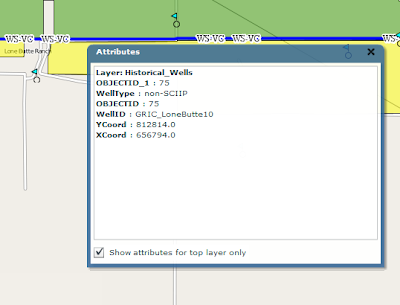
After playing with this, the results were pleasingly good. The one thing I'm finding is challenging is the ability for a selected WFS feature to be highlighted when selected. Since it is fully transparent.
I have a potential solution. And will share once I have tested
Let me step back quickly and explain the difference between WFS and WMS. Both involve calls to a spatial server, in this case to Geoserver. WFS returns the raw data. So Flex is able to draw the boundaries of features, making the feature interactive. The features attributes are also returned. Thus a click on a feature can return the features attributes without a additional server call. WMS simply returns an image. Getting the attributes for the latter would require both an additional server call and constructing a new query.
It struck me after thinking about this for a while. Why not combine WFS with WMS. Thus request both a styled WMS image and draw on this the WFS features. Make the WFS feature fully transparent, thus only the WMS styling shows.

After playing with this, the results were pleasingly good. The one thing I'm finding is challenging is the ability for a selected WFS feature to be highlighted when selected. Since it is fully transparent.
I have a potential solution. And will share once I have tested
Tuesday, December 15, 2009
OpenScales
I've been working for some time now with the Openscales AS3 library. Finally we have a Flex GIS client. The library is work in progress, but already offers really nice features and functions. At some point soon I will share some of my work and code. I've been busy customising core functional elements including adding Yahoo and Bing baselayers, restricting WFS rendering to scale, allowing WFS layers to be turned on and off, custom styling the interface and components. More to come.
Flex Web Services
I don't often use web services in Flex. But recetly found need to dip my toe in. The following I thought was an exellent simple example. taken from http://www.cflex.net/showFileDetails.cfm?ObjectID=582. Thanks Tracy.
<?xml version="1.0" encoding="utf-8"?>
<mx:Application xmlns:mx="http://www.adobe.com/2006/mxml" layout="absolute" xmlns="*"
creationComplete="getWeather()" >
<mx:Script>
<![CDATA[
import mx.controls.dataGridClasses.DataGridColumn;
import mx.rpc.events.ResultEvent;
import mx.managers.CursorManager;
import mx.controls.Alert;
default xml namespace = "http://www.webservicex.net"; //necessary to access the xml elements easily
[Bindable]private var _xmlResult:XML; //holds the result xml
[Bindable]private var _xlDayData:XMLList; //dataProvider for the day weather dataGrid
[Bindable]private var _sPlace:String;
/** invokes the web service operation to get the weather */
private function getWeather():void
{
CursorManager.setBusyCursor();
WS.GetWeatherByZipCode.send();
}
/** called by the WebService result event. Sets the dataProviders as necessary */
private function onResult(oEvent:ResultEvent):void
{
_xmlResult = XML(oEvent.result);
var xmlResultNode:XML = _xmlResult.GetWeatherByZipCodeResult[0];
var xmlDetailsNode:XML = xmlResultNode.Details[0];
outputInfo.text = _xmlResult.toXMLString();
_sPlace = xmlResultNode.PlaceName.text() + ", " + xmlResultNode.StateCode.text();
_xlDayData = xmlDetailsNode.WeatherData;
CursorManager.removeBusyCursor();
}//onResult
/** labelFunction for DataGrid. It seems that the namespace on the xml makes
* using the DataGridColumn dataField not work. At least I couldn't get it to work. */
private function lfDayData(oItem:Object, dgc:DataGridColumn):String
{
var sReturn:String = "";
var xmlItem:XML = XML(oItem); //get the item object cast as an xml object
var sHeaderText:String = dgc.headerText; //get the header text for this column
switch (sHeaderText) //logic to determine which node to get the data from
{
case "Day":
sReturn = xmlItem.Day.text();
break;
case "High":
sReturn = xmlItem.MaxTemperatureF.text();
break;
case "Low":
sReturn = xmlItem.MinTemperatureF.text();
break;
}
return sReturn;
}
]]>
</mx:Script>
<mx:WebService id="WS" wsdl="http://www.webservicex.net/WeatherForecast.asmx?WSDL"
useProxy="false"
fault="Alert.show(event.fault.faultString), 'Error'"
result="onResult(event)" >
<mx:operation name="GetWeatherByZipCode" resultFormat="e4x" >
<mx:request>
<ZipCode>{zipcode.text}</ZipCode>
</mx:request>
</mx:operation>
</mx:WebService>
<mx:Panel title="WebService Example" height="75%"
paddingTop="10" paddingBottom="10" paddingLeft="10" paddingRight="10" id="myPanel">
<mx:TextArea x="200" width="400" height="250" id="outputInfo" />
<mx:HBox>
<mx:Label width="100%" color="blue"
text="Enter a zip code."/>
<mx:TextInput id="zipcode" text="30117"/>
<mx:Button label="Get weather" click="getWeather()"/>
</mx:HBox>
<mx:Text id="txtPlace" htmlText="{_sPlace}"/>
<mx:DataGrid dataProvider="{_xlDayData}" height="180">
<mx:columns>
<mx:DataGridColumn labelFunction="lfDayData" headerText="Day" width="200" />
<mx:DataGridColumn labelFunction="lfDayData" headerText="High" width="100" />
<mx:DataGridColumn labelFunction="lfDayData" headerText="Low" width="100" />
</mx:columns>
</mx:DataGrid>
</mx:Panel>
</mx:Application>
<?xml version="1.0" encoding="utf-8"?>
<mx:Application xmlns:mx="http://www.adobe.com/2006/mxml" layout="absolute" xmlns="*"
creationComplete="getWeather()" >
<mx:Script>
<![CDATA[
import mx.controls.dataGridClasses.DataGridColumn;
import mx.rpc.events.ResultEvent;
import mx.managers.CursorManager;
import mx.controls.Alert;
default xml namespace = "http://www.webservicex.net"; //necessary to access the xml elements easily
[Bindable]private var _xmlResult:XML; //holds the result xml
[Bindable]private var _xlDayData:XMLList; //dataProvider for the day weather dataGrid
[Bindable]private var _sPlace:String;
/** invokes the web service operation to get the weather */
private function getWeather():void
{
CursorManager.setBusyCursor();
WS.GetWeatherByZipCode.send();
}
/** called by the WebService result event. Sets the dataProviders as necessary */
private function onResult(oEvent:ResultEvent):void
{
_xmlResult = XML(oEvent.result);
var xmlResultNode:XML = _xmlResult.GetWeatherByZipCodeResult[0];
var xmlDetailsNode:XML = xmlResultNode.Details[0];
outputInfo.text = _xmlResult.toXMLString();
_sPlace = xmlResultNode.PlaceName.text() + ", " + xmlResultNode.StateCode.text();
_xlDayData = xmlDetailsNode.WeatherData;
CursorManager.removeBusyCursor();
}//onResult
/** labelFunction for DataGrid. It seems that the namespace on the xml makes
* using the DataGridColumn dataField not work. At least I couldn't get it to work. */
private function lfDayData(oItem:Object, dgc:DataGridColumn):String
{
var sReturn:String = "";
var xmlItem:XML = XML(oItem); //get the item object cast as an xml object
var sHeaderText:String = dgc.headerText; //get the header text for this column
switch (sHeaderText) //logic to determine which node to get the data from
{
case "Day":
sReturn = xmlItem.Day.text();
break;
case "High":
sReturn = xmlItem.MaxTemperatureF.text();
break;
case "Low":
sReturn = xmlItem.MinTemperatureF.text();
break;
}
return sReturn;
}
]]>
</mx:Script>
<mx:WebService id="WS" wsdl="http://www.webservicex.net/WeatherForecast.asmx?WSDL"
useProxy="false"
fault="Alert.show(event.fault.faultString), 'Error'"
result="onResult(event)" >
<mx:operation name="GetWeatherByZipCode" resultFormat="e4x" >
<mx:request>
<ZipCode>{zipcode.text}</ZipCode>
</mx:request>
</mx:operation>
</mx:WebService>
<mx:Panel title="WebService Example" height="75%"
paddingTop="10" paddingBottom="10" paddingLeft="10" paddingRight="10" id="myPanel">
<mx:TextArea x="200" width="400" height="250" id="outputInfo" />
<mx:HBox>
<mx:Label width="100%" color="blue"
text="Enter a zip code."/>
<mx:TextInput id="zipcode" text="30117"/>
<mx:Button label="Get weather" click="getWeather()"/>
</mx:HBox>
<mx:Text id="txtPlace" htmlText="{_sPlace}"/>
<mx:DataGrid dataProvider="{_xlDayData}" height="180">
<mx:columns>
<mx:DataGridColumn labelFunction="lfDayData" headerText="Day" width="200" />
<mx:DataGridColumn labelFunction="lfDayData" headerText="High" width="100" />
<mx:DataGridColumn labelFunction="lfDayData" headerText="Low" width="100" />
</mx:columns>
</mx:DataGrid>
</mx:Panel>
</mx:Application>
Sunday, November 22, 2009
Flex and SOAP
Its always fun to work with Web service in Flex. Those pesky headers! Found a couple of terrific links on the subject. Now its easy :-)
http://www.actionscript.org/forums/showthread.php3?t=195916&highlight=e4x+faq
http://craigkaminsky.blogspot.com/2009/05/flex-3-make-net-namespaces-in-soap-xml.html
Just to put some code behind this....
Here is part of the feed:
<?xml version="1.0" encoding="utf-8" standalone="yes" ?>
<feed xml:base="http://www.placespr.com/WebDataService1.svc/" xmlns:d="http://schemas.microsoft.com/ado/2007/08/dataservices" xmlns:m="http://schemas.microsoft.com/ado/2007/08/dataservices/metadata" xmlns="http://www.w3.org/2005/Atom">
<title type="text">ptg_categories</title>
<id>http://www.placespr.com/webdataservice1.svc/ptg_categories</id>
<updated>2009-11-22T15:26:36Z</updated>
<link rel="self" title="ptg_categories" href="ptg_categories" />
<entry>
<id>http://www.placespr.com/WebDataService1.svc/ptg_categories(1)</id>
<title type="text" />
<updated>2009-11-22T15:26:36Z</updated>
<author>
<name />
</author>
<link rel="edit" title="ptg_categories" href="ptg_categories(1)" />
<category term="ponce_1000Model.ptg_categories" scheme="http://schemas.microsoft.com/ado/2007/08/dataservices/scheme" />
<content type="application/xml">
<m:properties>
<d:cat_id m:type="Edm.Int32">1</d:cat_id>
<d:name m:null="true" />
<d:service>hotels.asmx</d:service>
<d:icon>/images/icons/hotels.gif</d:icon>
<d:ordering m:type="Edm.Int32">1</d:ordering>
<d:counting m:type="Edm.Int32">75</d:counting>
</m:properties>
</content>
</entry>
......
and here is the modified code from these excellent links:
private function getCategoriesResult(evt:ResultEvent):void {
var respXML:XML = evt.result as XML;
var xmlSource:String = respXML.toXMLString();
//Strip off the headers
xmlSource = xmlSource.replace(/<[^!?]?[^>]+?>/g, removeNamspaces); // will invoke the function detailed below
var cleanXML:XML = XML(xmlSource);
for each( var item:XML in cleanXML.entry ) // looping over the reportHistory elements to act on them
{
trace( "name: " + item.content.properties.service);
}
}
// Web service response cleaner function
private function removeNamspaces(...rest):String
{
rest[0] = rest[0].replace(/xmlns[^"]+\"[^"]+\"/g, "");
var attrs:Array = rest[0].match(/\"[^"]*\"/g);
rest[0] = rest[0].replace(/\"[^"]*\"/g, "%attribute value%");
rest[0] = rest[0].replace(/(<\/?|\s)\w+\:/g, "$1");
while (rest[0].indexOf("%attribute value%") > 0)
{
rest[0] = rest[0].replace("%attribute value%", attrs.shift());
}
return rest[0];
}
http://www.actionscript.org/forums/showthread.php3?t=195916&highlight=e4x+faq
http://craigkaminsky.blogspot.com/2009/05/flex-3-make-net-namespaces-in-soap-xml.html
Just to put some code behind this....
Here is part of the feed:
<?xml version="1.0" encoding="utf-8" standalone="yes" ?>
<feed xml:base="http://www.placespr.com/WebDataService1.svc/" xmlns:d="http://schemas.microsoft.com/ado/2007/08/dataservices" xmlns:m="http://schemas.microsoft.com/ado/2007/08/dataservices/metadata" xmlns="http://www.w3.org/2005/Atom">
<title type="text">ptg_categories</title>
<id>http://www.placespr.com/webdataservice1.svc/ptg_categories</id>
<updated>2009-11-22T15:26:36Z</updated>
<link rel="self" title="ptg_categories" href="ptg_categories" />
<entry>
<id>http://www.placespr.com/WebDataService1.svc/ptg_categories(1)</id>
<title type="text" />
<updated>2009-11-22T15:26:36Z</updated>
<author>
<name />
</author>
<link rel="edit" title="ptg_categories" href="ptg_categories(1)" />
<category term="ponce_1000Model.ptg_categories" scheme="http://schemas.microsoft.com/ado/2007/08/dataservices/scheme" />
<content type="application/xml">
<m:properties>
<d:cat_id m:type="Edm.Int32">1</d:cat_id>
<d:name m:null="true" />
<d:service>hotels.asmx</d:service>
<d:icon>/images/icons/hotels.gif</d:icon>
<d:ordering m:type="Edm.Int32">1</d:ordering>
<d:counting m:type="Edm.Int32">75</d:counting>
</m:properties>
</content>
</entry>
......
and here is the modified code from these excellent links:
private function getCategoriesResult(evt:ResultEvent):void {
var respXML:XML = evt.result as XML;
var xmlSource:String = respXML.toXMLString();
//Strip off the headers
xmlSource = xmlSource.replace(/<[^!?]?[^>]+?>/g, removeNamspaces); // will invoke the function detailed below
var cleanXML:XML = XML(xmlSource);
for each( var item:XML in cleanXML.entry ) // looping over the reportHistory elements to act on them
{
trace( "name: " + item.content.properties.service);
}
}
// Web service response cleaner function
private function removeNamspaces(...rest):String
{
rest[0] = rest[0].replace(/xmlns[^"]+\"[^"]+\"/g, "");
var attrs:Array = rest[0].match(/\"[^"]*\"/g);
rest[0] = rest[0].replace(/\"[^"]*\"/g, "%attribute value%");
rest[0] = rest[0].replace(/(<\/?|\s)\w+\:/g, "$1");
while (rest[0].indexOf("%attribute value%") > 0)
{
rest[0] = rest[0].replace("%attribute value%", attrs.shift());
}
return rest[0];
}
Tuesday, November 17, 2009
IE8 Vista Problem
I'll not br rotten about Microsoft, since I develop on Windows .. but sometimes!!
I found I could not open IE, out of the blue. Spent a frustrating couple of hours troubleshooting. All to do with security updates and IE settins. The solution which worked of me is as follows:
Open internet explorer and go to menu TOOLS, than to INTERNET OPTIONS. Open the CONNECTION tab,and click on SETTINGS. You then uncheck the 'use of proxy server for this connection' and click ok .
I found I could not open IE, out of the blue. Spent a frustrating couple of hours troubleshooting. All to do with security updates and IE settins. The solution which worked of me is as follows:
Open internet explorer and go to menu TOOLS, than to INTERNET OPTIONS. Open the CONNECTION tab,and click on SETTINGS. You then uncheck the 'use of proxy server for this connection' and click ok .
Sunday, November 15, 2009
AlivePDF
Its been a hectic time with project work. Much to share particularly with regards the ArcGIS Flex API and the open source OpenScales Flex library.
Just a quick mention today on AlivePDF. Historically, I've had to generate PDF's in PHP. AlivePDF is based on the PHP library FPDF. It makes generating PDF's from Flex very straighforward. Alex Britez has written a simple example here.
Just a quick mention today on AlivePDF. Historically, I've had to generate PDF's in PHP. AlivePDF is based on the PHP library FPDF. It makes generating PDF's from Flex very straighforward. Alex Britez has written a simple example here.
Subscribe to:
Posts (Atom)