Just returning to my earlier post; using the Openscales API and combining WFS and WMS in one place. The goal was to use a styled map image (returned by a WMS call) and use Flex to draw the features on this image (via a WFS call), to give interactivity. One problem I found was that we needed to give the WFS drawn features a transparency of 0. This way we could get the interactivity (eg click on feature and get attributes pop up) but not see the drawn feature. But, suppose we want this selected feature highlighted in a different colour? Since the transparency is set to 0, the highlight will not be visible. How to get around this ....
Remember the Openscales map is constructed with multiple layers (imagine looking down at multiple sheets of tracing paper, on one there is a road drawn, on another a river etc all lined up correctly geographically). Our WFS (selected) layer is on one of these sheets. So all points marking well, for example, are on this one sheet. But all the points on this sheet have a transparency of 0, so they are there, but invisible. Now it is the sheet or layer which is set to 0 transparency not individual points (polygons or lines) The solution to being able to highlight a selected point (WFS feature)
......
Set a blank map feature layer. Set the transparency to 1. When a point is selected copy this to the blank layer. Hey presto it appears, Make sure when you unselect the point you both copy the point back to its original layer and then clear the blank layer.
Showing posts with label wms. Show all posts
Showing posts with label wms. Show all posts
Monday, August 2, 2010

Tuesday, July 27, 2010
Flex - Styling Interactive Maps
I had an interesting question recently. This was with regards building a mapping application using the open source mapping Flex library Openscales. He wanted to improve the styling of the map layers, but still be able to click on a feature and return attributes. Now Openscales is nice since both WMS and WFS calls are easy.
Let me step back quickly and explain the difference between WFS and WMS. Both involve calls to a spatial server, in this case to Geoserver. WFS returns the raw data. So Flex is able to draw the boundaries of features, making the feature interactive. The features attributes are also returned. Thus a click on a feature can return the features attributes without a additional server call. WMS simply returns an image. Getting the attributes for the latter would require both an additional server call and constructing a new query.
It struck me after thinking about this for a while. Why not combine WFS with WMS. Thus request both a styled WMS image and draw on this the WFS features. Make the WFS feature fully transparent, thus only the WMS styling shows.
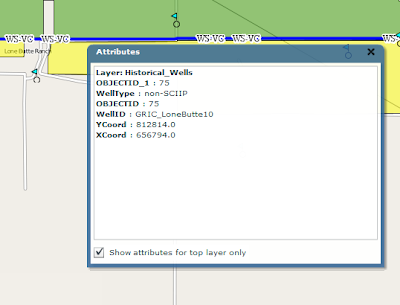
After playing with this, the results were pleasingly good. The one thing I'm finding is challenging is the ability for a selected WFS feature to be highlighted when selected. Since it is fully transparent.
I have a potential solution. And will share once I have tested
Let me step back quickly and explain the difference between WFS and WMS. Both involve calls to a spatial server, in this case to Geoserver. WFS returns the raw data. So Flex is able to draw the boundaries of features, making the feature interactive. The features attributes are also returned. Thus a click on a feature can return the features attributes without a additional server call. WMS simply returns an image. Getting the attributes for the latter would require both an additional server call and constructing a new query.
It struck me after thinking about this for a while. Why not combine WFS with WMS. Thus request both a styled WMS image and draw on this the WFS features. Make the WFS feature fully transparent, thus only the WMS styling shows.

After playing with this, the results were pleasingly good. The one thing I'm finding is challenging is the ability for a selected WFS feature to be highlighted when selected. Since it is fully transparent.
I have a potential solution. And will share once I have tested
Sunday, September 20, 2009
WMS and Bing/Yahoo Basemap Overlays
Here is an interesting issue I found today with WMS overlay. When WMS layers are created in either Mapserver or Geoserver then added as overlays to Yahoo or Bing their alignment is wrong.
Let me step back. As mentioned in earlier posts. One can create a WMS layer in geoserver and through the excellent config interface add this as a layer to Google earth.

All align perfectly. Now adding the same WMS to Modest Maps and overlaying it on Yahoo shows the WMS misaligned:

Turning to Openlayers, I find the same problem:

In each of the latter cases the WMS layer also looks stretched. I'll find the fix and post it.
Let me step back. As mentioned in earlier posts. One can create a WMS layer in geoserver and through the excellent config interface add this as a layer to Google earth.

All align perfectly. Now adding the same WMS to Modest Maps and overlaying it on Yahoo shows the WMS misaligned:

Turning to Openlayers, I find the same problem:

In each of the latter cases the WMS layer also looks stretched. I'll find the fix and post it.
Sunday, September 13, 2009
Modest Maps, WMS and Overview
Looking at the docs on wms and multiple providers the following proved a useful link:
http://getsatisfaction.com/modestmaps/topics/how_to_layer_two_maps_with_different_providers_for_blending_alpha_transparency_etc
I'll post my code in due course.
On a related note, here is a URL for an overview map with Modest maps
http://blog.modestmaps.com/2008/11/hello-world/
http://getsatisfaction.com/modestmaps/topics/how_to_layer_two_maps_with_different_providers_for_blending_alpha_transparency_etc
I'll post my code in due course.
On a related note, here is a URL for an overview map with Modest maps
http://blog.modestmaps.com/2008/11/hello-world/
Friday, September 11, 2009
WMS and MapServer
I'm in the process of setting up Mapserver to serve up maps via WMS. It has been a while. The steps I went through are as follows:
1) Download MS4W . This is a package which bundles Mapserver with PHP and Apache. Saves time on configuration. I set the Apache port to 81, since I already have another version running on 80. The default location of all installed files is c:/ms4w.
2) Installed Quantum GIS. Again you can use another bundled package which includes geoserver and many other open source tools. Alternatively you can get the software direct.
3) Quantum GIS contains a nifty plug in for generating .map or mapfiles for Mapserver (the alternative is to write them by hand which can be a major pain). This can be done via the plugin menu option. Once installed, this is the plug in window:
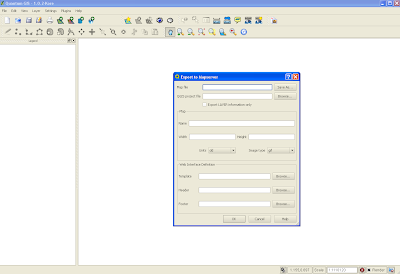
Two things to remember. First, create an empty .map file in your favourite text editor. In the plug in interface, you need to point to an existing .map file. The Quantum plug in will overwrite this file. Second, I found it easier to put the .map file and shapefiles (at least for this initial trial) in the same directory.
You should now have a working mapfile. Now for WMS. You will need to edit the generated mapfile to add additional parameters. This and the required url parameters are a pain. After much searching I found these two links very useful:
http://www.mapserver.org/ogc/wms_server.html#table-of-contents
http://ms.gis.umn.edu:8081/ms_plone/docs/howto/mapcontext
I'll not walk too much through the additions, but they mostly involve adding elements under the METADATA tag. Here is my working mapfile:
# Map file created from QGIS project file C:/matts/generatefile/test.qgs
# Edit this file to customize for your map interface
# (Created with PyQgis MapServer Export plugin)
MAP
NAME test
# Map image size
SIZE 400 300
#UNITS meters
EXTENT -97.616877 39.917875 -81.745000 51.087523
PROJECTION
'proj=longlat'
'ellps=WGS84'
'datum=WGS84'
'no_defs'
''
END
# Background color for the map canvas -- change as desired
# IMAGECOLOR 192 192 192
#IMAGEQUALITY 95
IMAGETYPE png
OUTPUTFORMAT
NAME png
DRIVER "GD/PNG"
MIMETYPE "image/png"
IMAGEMODE RGB
EXTENSION "png"
FORMATOPTION "INTERLACE=OFF"
END
# Legend
LEGEND
IMAGECOLOR 255 255 255
STATUS ON
KEYSIZE 18 12
LABEL
TYPE BITMAP
SIZE MEDIUM
COLOR 0 0 89
END
END
# Web interface definition. Only the template parameter
# is required to display a map. See MapServer documentation
WEB
# Set IMAGEPATH to the path where MapServer should
# write its output.
IMAGEPATH '/tmp/'
# Set IMAGEURL to the url that points to IMAGEPATH
# as defined in your web server configuration
IMAGEURL 'http://localhost:81/wms_mapserver/tmp'
# WMS server settings
METADATA
'wms_title' 'test'
'wms_onlineresource' 'http://localhost:81/cgi-bin/mapserv.exe?map=C:/ms4w/Apache/htdocs/wms_mapserver/data/ms_wms.map&'
'wms_srs' 'EPSG:4326'
"wms_extent" "201621.496941 -294488.285333 1425518.020722 498254.511514"
#"wfs_title" "test WFS Demo Server" ## REQUIRED
END
#Scale range at which web interface will operate
# Template and header/footer settings
# Only the template parameter is required to display a map. See MapServer documentation
END
LAYER
NAME 'states_ugl'
TYPE POLYGON
DATA 'C:/ms4w/Apache/htdocs/wms_mapserver/data/states_ugl.shp'
METADATA
"wms_name" "states"
"wms_server_version" "1.1.1"
"wms_format" "image/png"
"wms_srs" "EPSG:4326"
"wms_title" "States" ##required
"wms_extent" "201621.496941 -294488.285333 1425518.020722 498254.511514"
"wms_onlineresource" "http://localhost:81/cgi-bin/mapserv.exe?map=C:/ms4w/Apache/htdocs/wms_mapserver/data/ms_wms.map?"
#"wfs_version" "1.1.0"
# "wfs_srs" "EPSG:4326"
# "wfs_typename" "statefs"
# "wfs_request_method" "GET"
# "wfs_service" "WFS"
#"wfs_title" "statefs" ## REQUIRED
#"gml_featureid" "ID" ## REQUIRED
#"gml_include_items" "all" ## Optional (serves all attributes for layer)
END
#CONNECTIONTYPE WMS
STATUS ON
TRANSPARENCY 100
PROJECTION
'proj=longlat'
'ellps=WGS84'
'datum=WGS84'
'no_defs'
''
END
CLASS
NAME 'states_ugl'
STYLE
SYMBOL 0
SIZE 2
OUTLINECOLOR 0 0 0
COLOR 144 50 207
END
END
END
END
As you can see this sits in the following directory with my shapefile:
C:/ms4w/Apache/htdocs/wms_mapserver/data
I did my testing using Internet Explorer. As mentioned, the required url parameters are a pain. Here are the two key calls; getCapabilities:
http://localhost:81/cgi-bin/mapserv.exe?map=/ms4w/Apache/htdocs/wms_mapserver/data/ms_wms.map&SERVICE=WMS&VERSION=1.1.1&REQUEST=GetCapabilities
and getMap. Note all parameters except styles are required:
http://localhost:81/cgi-bin/mapserv.exe?map=/ms4w/Apache/htdocs/wms_mapserver/data/ms_wms.map&service=WMS&version=1.1.1&request=GetMap&layers=states_ugl&srs=EPSG:4326&bbox=-97.6169,39.9179,-81.745,51.0875&format=image/png&width=400&height=300&styles=default
I struggled for a while on the getMap call. One problem I realised was the BBox parameters you need to get from getCapabilities (I grabbed it directly from the mapfile). I also initially added connectiontype "wms" for the layer in the mapfile which broke everything - actually i could not generate an image. As soon as that was removed bingo.
Grab this source, unrar and place in your C:/ms4w/Apache/htdocs. You should now be able to run the above.
1) Download MS4W . This is a package which bundles Mapserver with PHP and Apache. Saves time on configuration. I set the Apache port to 81, since I already have another version running on 80. The default location of all installed files is c:/ms4w.
2) Installed Quantum GIS. Again you can use another bundled package which includes geoserver and many other open source tools. Alternatively you can get the software direct.
3) Quantum GIS contains a nifty plug in for generating .map or mapfiles for Mapserver (the alternative is to write them by hand which can be a major pain). This can be done via the plugin menu option. Once installed, this is the plug in window:

Two things to remember. First, create an empty .map file in your favourite text editor. In the plug in interface, you need to point to an existing .map file. The Quantum plug in will overwrite this file. Second, I found it easier to put the .map file and shapefiles (at least for this initial trial) in the same directory.
You should now have a working mapfile. Now for WMS. You will need to edit the generated mapfile to add additional parameters. This and the required url parameters are a pain. After much searching I found these two links very useful:
http://www.mapserver.org/ogc/wms_server.html#table-of-contents
http://ms.gis.umn.edu:8081/ms_plone/docs/howto/mapcontext
I'll not walk too much through the additions, but they mostly involve adding elements under the METADATA tag. Here is my working mapfile:
# Map file created from QGIS project file C:/matts/generatefile/test.qgs
# Edit this file to customize for your map interface
# (Created with PyQgis MapServer Export plugin)
MAP
NAME test
# Map image size
SIZE 400 300
#UNITS meters
EXTENT -97.616877 39.917875 -81.745000 51.087523
PROJECTION
'proj=longlat'
'ellps=WGS84'
'datum=WGS84'
'no_defs'
''
END
# Background color for the map canvas -- change as desired
# IMAGECOLOR 192 192 192
#IMAGEQUALITY 95
IMAGETYPE png
OUTPUTFORMAT
NAME png
DRIVER "GD/PNG"
MIMETYPE "image/png"
IMAGEMODE RGB
EXTENSION "png"
FORMATOPTION "INTERLACE=OFF"
END
# Legend
LEGEND
IMAGECOLOR 255 255 255
STATUS ON
KEYSIZE 18 12
LABEL
TYPE BITMAP
SIZE MEDIUM
COLOR 0 0 89
END
END
# Web interface definition. Only the template parameter
# is required to display a map. See MapServer documentation
WEB
# Set IMAGEPATH to the path where MapServer should
# write its output.
IMAGEPATH '/tmp/'
# Set IMAGEURL to the url that points to IMAGEPATH
# as defined in your web server configuration
IMAGEURL 'http://localhost:81/wms_mapserver/tmp'
# WMS server settings
METADATA
'wms_title' 'test'
'wms_onlineresource' 'http://localhost:81/cgi-bin/mapserv.exe?map=C:/ms4w/Apache/htdocs/wms_mapserver/data/ms_wms.map&'
'wms_srs' 'EPSG:4326'
"wms_extent" "201621.496941 -294488.285333 1425518.020722 498254.511514"
#"wfs_title" "test WFS Demo Server" ## REQUIRED
END
#Scale range at which web interface will operate
# Template and header/footer settings
# Only the template parameter is required to display a map. See MapServer documentation
END
LAYER
NAME 'states_ugl'
TYPE POLYGON
DATA 'C:/ms4w/Apache/htdocs/wms_mapserver/data/states_ugl.shp'
METADATA
"wms_name" "states"
"wms_server_version" "1.1.1"
"wms_format" "image/png"
"wms_srs" "EPSG:4326"
"wms_title" "States" ##required
"wms_extent" "201621.496941 -294488.285333 1425518.020722 498254.511514"
"wms_onlineresource" "http://localhost:81/cgi-bin/mapserv.exe?map=C:/ms4w/Apache/htdocs/wms_mapserver/data/ms_wms.map?"
#"wfs_version" "1.1.0"
# "wfs_srs" "EPSG:4326"
# "wfs_typename" "statefs"
# "wfs_request_method" "GET"
# "wfs_service" "WFS"
#"wfs_title" "statefs" ## REQUIRED
#"gml_featureid" "ID" ## REQUIRED
#"gml_include_items" "all" ## Optional (serves all attributes for layer)
END
#CONNECTIONTYPE WMS
STATUS ON
TRANSPARENCY 100
PROJECTION
'proj=longlat'
'ellps=WGS84'
'datum=WGS84'
'no_defs'
''
END
CLASS
NAME 'states_ugl'
STYLE
SYMBOL 0
SIZE 2
OUTLINECOLOR 0 0 0
COLOR 144 50 207
END
END
END
END
As you can see this sits in the following directory with my shapefile:
C:/ms4w/Apache/htdocs/wms_mapserver/data
I did my testing using Internet Explorer. As mentioned, the required url parameters are a pain. Here are the two key calls; getCapabilities:
http://localhost:81/cgi-bin/mapserv.exe?map=/ms4w/Apache/htdocs/wms_mapserver/data/ms_wms.map&SERVICE=WMS&VERSION=1.1.1&REQUEST=GetCapabilities
and getMap. Note all parameters except styles are required:
http://localhost:81/cgi-bin/mapserv.exe?map=/ms4w/Apache/htdocs/wms_mapserver/data/ms_wms.map&service=WMS&version=1.1.1&request=GetMap&layers=states_ugl&srs=EPSG:4326&bbox=-97.6169,39.9179,-81.745,51.0875&format=image/png&width=400&height=300&styles=default
I struggled for a while on the getMap call. One problem I realised was the BBox parameters you need to get from getCapabilities (I grabbed it directly from the mapfile). I also initially added connectiontype "wms" for the layer in the mapfile which broke everything - actually i could not generate an image. As soon as that was removed bingo.
Grab this source, unrar and place in your C:/ms4w/Apache/htdocs. You should now be able to run the above.
Subscribe to:
Posts (Atom)